
Tachiyomi APK Older Versions: Download & Install Guide
Learn how to download and install older versions of Tachiyomi APK. Find the best version for your needs with our easy step-by-step guide.
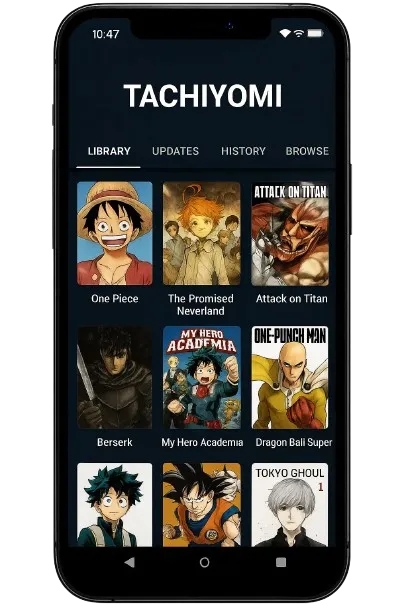
Tachiyomi is a popular manga reader app for Android, but sometimes newer versions may not work well on all devices or might not have the features you prefer. If you want to use an older version of Tachiyomi, this guide will show you how to safely download and install it. We’ll explain why you might need an older version, how to find trusted sources, and provide easy step-by-step instructions for installation. Whether you’re using an older phone or just want a familiar version, this guide will help you choose the best Tachiyomi APK for your needs.
Why People Use Older Tachiyomi Versions
There are several reasons why someone might prefer an older version of Tachiyomi over the latest one. Here are the most common reasons:
1. Compatibility with Older Devices
Newer versions of Tachiyomi may require more processing power or newer Android versions, which can make them slow or even incompatible with older phones or tablets. Using an older version can help improve performance on devices with limited resources.
2. Preferred Features or Interface
Over time, Tachiyomi’s updates have brought changes to its design and functionality. Some users may prefer the user interface or features of older versions. If you liked how a previous version worked, sticking with that version can offer a more familiar experience.
3. Extension Compatibility
Tachiyomi uses various extensions to pull manga from different sources. Sometimes, newer versions may cause issues with older extensions, or certain extensions might only work well with specific versions of the app. By using an older version, you can ensure better compatibility with your favorite extensions.
4. Stability or Bug Fixes
Sometimes, new updates can introduce bugs or instability. If you find that a new version of Tachiyomi crashes or has issues, reverting to an older version may be the solution. Older versions tend to be more stable for certain users.
How to Install an Older Version of Tachiyomi
Installing an older version of Tachiyomi is simple. Follow these steps:
1. Backup Your Data (Optional)
If you want to keep your manga library and settings, go to Settings > Backup > Export data and save it.
2. Allow Unknown Sources
To install APKs from outside the Google Play Store:
- Go to Settings > Security.
- Enable Install from Unknown Sources for your browser or file manager.
3. Download the APK
Visit a trusted site like official website tachiyomiapk.net or APKPure, find the version you need, and download the APK.
4. Install the APK
Once downloaded, open the APK file from your Downloads folder and tap Install.
5. Restore Your Data (If Needed)
After installation, open Tachiyomi and restore your backup (if you created one). Check that everything is working correctly.
Which Version Should You Choose?
Choosing the right version of Tachiyomi depends on your device, needs, and preferences. Here’s a quick guide to help you decide:
For Older or Low-Spec Devices
If you’re using an older phone or one with limited processing power, it’s best to choose an earlier version like v0.8 to v0.10. These versions are lightweight and work well on older Android devices (Android 4.4 and below). They may not have the latest features, but they offer basic functionality without compromising performance.
For Stability
If you’re looking for a stable version that balances features and reliability, v0.12 to v0.14 is a great choice. These versions offer a refined user interface and support a wide range of extensions while maintaining stability, especially for devices running Android 5.0 or higher.
For New Features and Performance
If your device is running Android 7.0 or newer, v0.15.3 is the best option. This version includes the latest features like cloud sync, improved extension support, and bug fixes. It’s perfect if you want the latest features but have a modern device that can handle the newer version.
Risks and Drawbacks of Using Older Versions
While older versions of Tachiyomi can be useful, there are some risks and drawbacks you should be aware of:
1. Security Risks
Older versions may not include the latest security patches, which could leave your device vulnerable to threats. Using outdated software can expose you to malware or other security issues, so it’s important to ensure you’re not missing critical updates.
2. Extension and Source Compatibility
Newer extensions or manga sources may not work with older versions of the app. If you rely on specific extensions or manga websites, they might only be compatible with the most recent builds, meaning you could lose access to some of your favorite features.
3. Stability Issues
Older versions, especially those not officially supported, can be more prone to bugs or crashes. As Tachiyomi evolves, some older versions may not perform as well, and you may experience crashes or data loss.
4. Lack of Official Support
Using older versions means you won’t receive updates or fixes directly from the official Tachiyomi team. If you encounter an issue, you may have a harder time finding support or troubleshooting help.
Troubleshooting Common Problems
Sometimes, older versions of Tachiyomi can run into issues. Here are some common problems and how to fix them:
1. Crashes or APK Won’t Install
If the APK won’t install or the app keeps crashing:
- Check Compatibility: Ensure the version you downloaded is compatible with your Android version.
- Clear Cache: If you’ve installed a newer version recently, clear the cache or uninstall it before trying the older APK.
- Re-download APK: The downloaded APK file might be corrupted. Try downloading it again from a trusted source.
2. Extensions Not Working or Missing
If extensions aren’t loading or certain manga sources are unavailable:
- Reinstall Extensions: Some extensions may need to be manually reinstalled. Go to the Tachiyomi extensions menu and add the ones you need.
- Update Extensions: Older versions may not support newer extension updates. If possible, update extensions manually.
3. Manga Library or Data Lost After Downgrade
If you’ve lost your manga library or settings after downgrading:
- Restore Backup: If you backed up your data before downgrading, go to Settings > Backup and restore your library.
- Check File Manager: If you didn’t back up, check your device’s storage for manga files and manually add them back to Tachiyomi.
Conclusion
Using an older version of Tachiyomi can be useful for better performance on older devices or if you prefer a specific interface. However, keep in mind that older versions may lack security updates and may not be compatible with newer extensions.
By following the steps in this guide, you can safely download and install an older version. Just be sure to back up your data, use trusted sources, and be aware of the limitations of using outdated software.